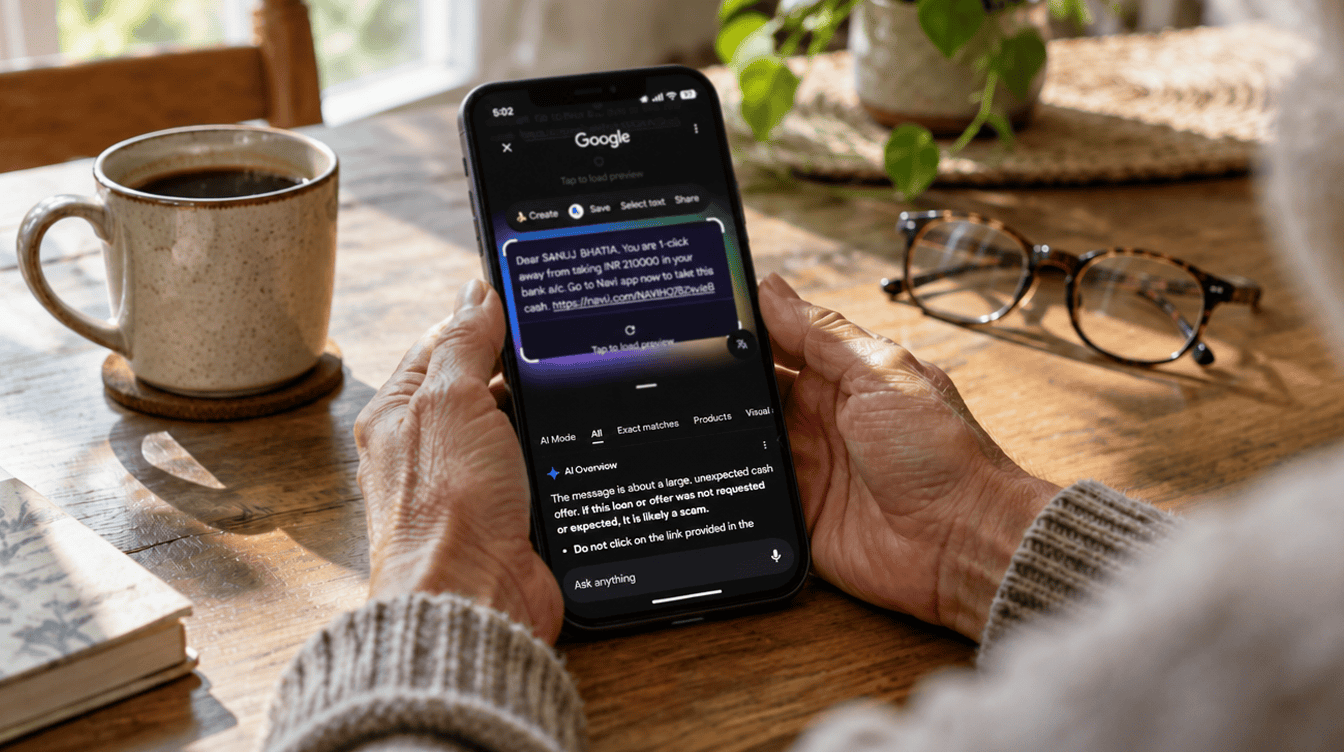
On October 15, 2026, Google put a spotlight on a tool many Android owners already carry without knowing it: Circle to Search can look over a sketchy message and tell you whether it smells like a con. Picture a text that reads “Your package is on hold. Confirm your address here” from a number you have never seen. Instead of guessing, you can check if a text is a scam in a few seconds, right from the screen you are already on.
That matters because the most damaging moment in a text scam is the tap. Circle to Search gives you a second opinion before you click a link or hand over personal details, and it is part of the phone’s own search tools rather than a separate app.
What you need before you start
The requirements are short, though Google is careful to say that results, availability and compatibility may vary. Here is what you need to check if a text is a scam this way.
| Requirement | Details |
|---|---|
| Phone | An Android phone that supports Circle to Search, such as recent Pixel and Samsung Galaxy models |
| Connection | An active internet connection |
| Setting | Hold home to search turned on if you use buttons, or Hold handle to search if you use swipe gestures |
| Region | AI Overviews only appear in certain regions and for certain queries |
Google’s own Circle to Search guide lists phones such as the Pixel 8 and 8 Pro, Pixel 7, 7 Pro and 7a, Pixel Fold, the Galaxy S24 and S23 families, the Galaxy Z Flip5 and Z Fold5, and the Galaxy Tab S9, and notes that more devices pick it up through software updates. Google has not published a separate device or country list for the scam check itself.
How to check if a text is a scam in 4 steps
- Open the message, but leave the link alone. Read it in your messaging app as usual. Do not tap any link, call any number in it, or reply.
- Wake up Circle to Search. Long-press the home button at the bottom of the screen. If your phone uses swipe gestures instead of buttons, long-press the thin navigation handle. A search bar slides up at the bottom with a burst of color.
- Draw a circle around the text. Use your finger to loop around the whole suspicious message, including the sender line and any link, so the tool sees the full picture.
- Read the AI Overview and act on it. Google says the overview explains what looks off and what to do about it. When it flags warning signs, delete the message and block the number it came from.
If nothing happens on step 2, open your phone’s Settings and search for Hold home to search or Hold handle to search, depending on how you get around your phone, and turn it on.
Messages worth running through the check
Not every odd text deserves suspicion, and you do not need to check if a text is a scam when it comes from a saved contact about plans you expected. Still, a few patterns show up again and again in family group chats and inboxes. These are good candidates for a quick scan:
- “Your delivery could not be completed. Update your details within 24 hours.”
- “Hi Mom, I dropped my phone in the sink. This is my new number, can you send money for a replacement?”
- “Unusual sign-in detected on your bank account. Verify now.”
- “You have an unpaid toll. Pay today to avoid a late fee.”
What these share is pressure. A short deadline, a relative in a jam, or a threat of fees is designed to make you act before you think. Running a quick check if a text is a scam before acting builds in exactly the pause the sender is hoping you skip.
How to tell if a text is a scam when the tool is unsure
AI answers are a helpful nudge, not a guarantee. Learning to check if a text is a scam on your own is still the skill that protects you on every device. If the overview is vague or you cannot use the feature at all, fall back on a few habits that work on any phone:
- Check the sender. A real company usually texts from a short code or a number you recognize, not a random personal number.
- Contact the person another way. If a family member is asking for money, call the number you already have saved for them.
- Go to the source directly. For banks, carriers and delivery companies, open their official app or type their web address yourself instead of using the link.
- Never share codes. No legitimate company needs the one-time code it just sent you.
Pair those habits with a strong account login, such as a Google passkey on your phone or computer, and a stolen password becomes far less useful to a scammer.
Limits of Circle to Search scam detection
The biggest limit is that it only works when you ask. You have to decide to check if a text is a scam; the phone will not do it for you here. Circle to Search does not watch incoming texts in the background, so it cannot warn anyone who never thinks to circle the message. That makes it a better fit for the cautious member of the household than for a relative who taps first and asks later.
The second limit is coverage. A tool built to check if a text is a scam is only as useful as the answer it can show you. Because AI Overviews are offered only in some regions and for some queries, the result you see may differ from what a friend in another country sees. Google has also not said how accurate the scam verdicts are, so treat a clean result as reassuring rather than final.
For a broader look at how scammers follow the headlines, our guide on avoiding post-hurricane scams and protecting your identity covers the same tricks in a different setting.
Frequently asked questions about scam texts
Can you get scammed by text?
Yes. Most text scams work by getting you to tap a link, reply, call a number or send money, so the safest move is to pause and check the message before doing any of those.
How do I know if a text is legit?
Look at who sent it, whether it pushes you to act fast, and whether it asks for money or codes. When in doubt, contact the company or person through a number or app you already trust.
Does Circle to Search check my texts automatically?
No. It only reviews a message when you long-press the home button or navigation handle and circle that message yourself.
Should you make Circle to Search your first stop for odd texts?
If your Android phone supports it, yes: it is already on the phone, and it takes less time than reading the scam itself. Show it to the parents and grandparents in your life the next time you visit, and keep the old rules about links and codes in place for everyone else. A few seconds spent to check if a text is a scam is the cheapest insurance your phone offers.