

Last Updated: January 2026 | Reading Time: 4 minutes | Author: First and Geek Editorial Team
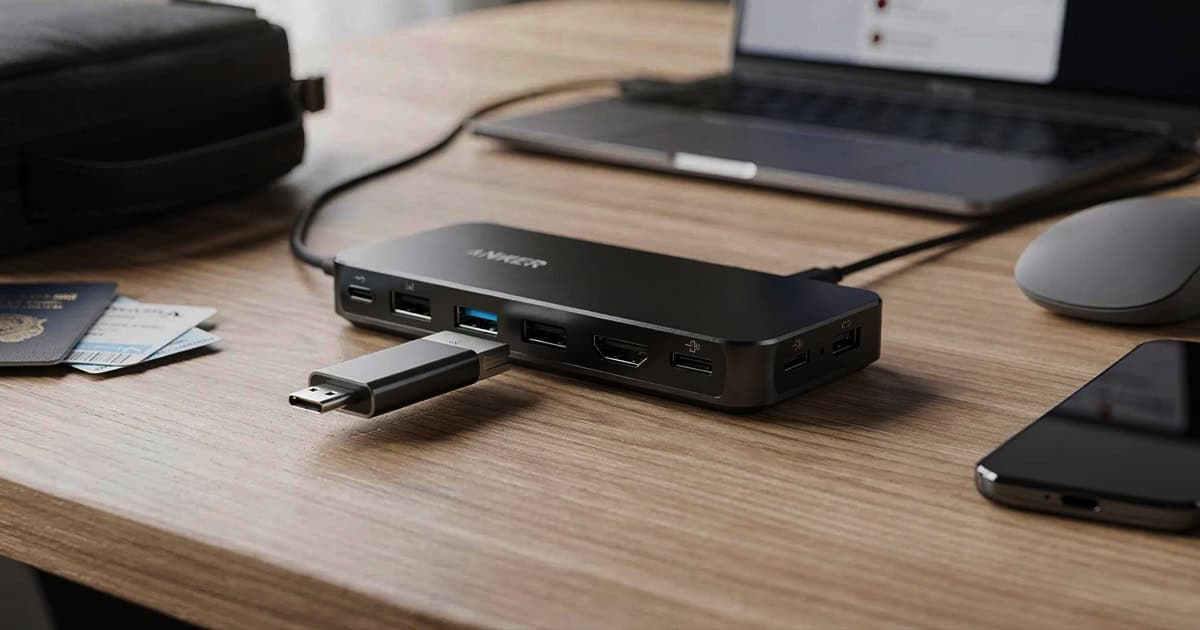
Anker has introduced an innovative solution for MacBook and iPad Pro users who need comprehensive connectivity at home and portable ports on the go. The new Anker Nano Docking Station features a unique detachable USB-C hub that magnetically separates from the main unit, offering genuine versatility without requiring multiple accessories.
What Makes This Dock Different
The Anker Nano Docking Station distinguishes itself with a simple but thoughtful design. While it functions as a traditional 13-port desktop dock, it includes a mechanical switch on top that releases a smaller USB-C hub from the center of the unit. This detachable section magnetically reconnects when you return to your desk, creating a genuinely modular setup rather than just another stationary dock.
For MacBook Air users who have limited built-in ports, or iPad Pro owners working with only a single USB-C connection, this approach offers practical flexibility. You get full desktop connectivity when you need it, and a compact travel hub without purchasing separate devices.
Full Dock Specifications
When fully assembled at your desk, the Anker Nano Docking Station provides 13 ports distributed across the rear and front panels. Understanding what’s available helps determine if this dock matches your workflow.
Rear Panel Connectivity
- 1 USB-C uplink port for connecting and charging your MacBook
- Gigabit Ethernet port for wired network connections
- 2 HDMI ports supporting external displays
- 2 USB-A ports for peripherals and accessories
- 1 DisplayPort connector for additional monitor support
Front Panel Access
- SD card reader
- microSD card reader
- 1 USB-A port
- 2 USB-C data ports
- 3.5mm headphone jack
This array covers most common desktop needs, from display output to card readers for photographers and videographers. The front-facing ports provide convenient access for frequently connected devices without reaching behind your desk.
The Detachable Travel Hub
The removable center section serves as a standalone USB-C hub when separated from the main dock. This portable component includes a subset of the full dock’s capabilities, selected for typical mobile use cases.
On the travel hub itself, you’ll find the same SD and microSD card readers accessible when docked, along with one USB-A port and one USB-C data port. These ports are physically shared with the full dock, meaning they’re available whether the hub is attached or removed. The bottom of the detachable unit adds functionality specifically for portable use: an additional USB-C port with Power Delivery charging support and an HDMI port for connecting to external displays during presentations or remote work.
This configuration addresses real-world scenarios. If you’re presenting at a client site with your MacBook Air, you can grab just the small hub section rather than packing a separate dongle. iPad Pro users gain proper USB-A support and display output without carrying additional accessories. The magnetic reconnection means you’re not dealing with loose pieces or complicated reassembly when you return home.
Who Benefits Most From This Design
This docking station makes the most sense for specific user profiles. MacBook Air owners often struggle with the limited two USB-C ports on their machines, making any dock valuable, but the detachable hub adds genuine travel utility. Similarly, iPad Pro users working between locations gain a consistent connectivity solution without managing multiple adapters.
Photographers and content creators who regularly transfer media from SD cards both at home studios and on location will appreciate having card readers available in both contexts. The approach also simplifies tech management for anyone tired of maintaining separate desk and travel connectivity kits.
Conversely, if your MacBook Pro already provides sufficient ports for portable use, or if you rarely work away from your desk, a traditional fixed dock might serve you equally well at potentially lower cost. The modular design carries value primarily when you genuinely need both stationary and mobile connectivity.
Pricing and Availability
The Anker Nano Docking Station is currently available through Amazon with a launch sale price of $109.99. Despite being announced at CES 2026, the product has already begun shipping to customers with Prime delivery options available.
This pricing positions the dock competitively within the USB-C hub market, particularly considering the dual-use design. Separate desktop docks and travel hubs would typically cost more combined than this single unit, though the value proposition depends on whether you’ll actually use both configurations regularly.
FAQ
Q: Does the detachable hub work independently without the main dock?
A: Yes, the removable USB-C hub functions as a completely standalone accessory when separated from the main docking station. It includes its own USB-C connection for attaching to your MacBook or iPad Pro and doesn’t require the base unit to operate.
Q: What display resolutions are supported through the HDMI and DisplayPort connections?
A: While specific resolution and refresh rate details weren’t provided in the initial product information, most current Anker docks support at least 4K resolution at 60Hz. Check the product specifications on the retail listing for exact display capabilities, as these can vary based on your MacBook model and connection type.
Q: Can the dock charge my MacBook while connected?
A: Yes, the rear USB-C uplink port is designed to both connect your MacBook and provide power delivery for charging. However, the exact wattage wasn’t specified in the announcement, so verify that it meets your MacBook’s charging requirements, particularly if you use a 14-inch or 16-inch MacBook Pro that benefits from higher wattage adapters.
Q: Is the dock compatible with Windows laptops and other USB-C devices?
A: Yes, the Anker Nano Docking Station should work with any device featuring USB-C connectivity, including Windows laptops, Chromebooks, and Android tablets. The functionality isn’t limited to Apple products, though it’s particularly well-suited to MacBooks and iPad Pros that have minimal built-in ports.
First and Geek Verdict
The Anker Nano Docking Station offers a genuinely practical solution to a common problem: needing comprehensive connectivity at your desk but also requiring portable ports when traveling. Rather than forcing users to buy separate products or compromise on functionality, the detachable hub design addresses both scenarios in a single purchase.
The execution appears thoughtful, with the magnetic reconnection avoiding fussy alignment and the port selection matching actual use cases rather than just maximizing numbers. At $109.99 during the launch sale, the pricing seems reasonable for the versatility provided, particularly for MacBook Air and iPad Pro users who would otherwise need multiple accessories.
That said, this dock makes most sense if you genuinely work in both stationary and mobile environments. If you rarely leave your desk, a traditional fixed dock might suffice. And if you primarily work on the go, a dedicated travel hub could be more compact. But for those who regularly move between contexts and value reducing the number of accessories in their bag, the Anker Nano Docking Station delivers a smart, well-considered design that earns its place in your tech setup.