You know the email is in there somewhere. The soccer schedule, the plumber’s quote, the confirmation for next month’s flight. You type a word into the search bar, scroll past a pile of old newsletters and give up. The iOS 27 Mail features Apple shipped on September 14, 2026 go right at that frustration, along with a few smaller upgrades that make replying to and acting on email quicker.
Here is the quick version. Search now tries to put the message you meant at the top, suggestion cards inside an email can hand off to apps made by other companies, and Smart Reply can pick up on how you write. The smartest pieces depend on Apple Intelligence and Siri AI, so not every iPhone that runs iOS 27 gets the full package.
What the iOS 27 Mail features change about search
Apple rebuilt the way Mail ranks what you find. Its iOS 27 release notes describe a brand-new ranking method that lifts better matches into Top Hits, the short list shown first when you search.
In plain English, Mail is now guessing which message you are after instead of dumping every email that contains your word, newest first. Search for a hotel name and the booking confirmation should sit near the top, ahead of the promo emails that hotel sends every week.
Apple has not said what signals the ranking uses, or whether you can switch back to a date-sorted list.
Suggestions that reach beyond Apple’s own apps
Mail has shown small suggestion cards for a while when it spots something you might want to act on. With iOS 27, those cards get smarter and, for the first time, can take action through third-party apps. Apple confirmed this in its June 8 Apple Intelligence announcement.
The example Apple gives is a dinner booking: Mail can pick out the restaurant and reservation details from an email so you can do something with them without copying and pasting. Which outside apps join in depends on their developers, and Apple has not published a list.
One catch applies to this part of the iOS 27 Mail features: Apple’s footnotes say suggestions in Mail and Messages are available in English only.
Smart Reply that sounds more like you
Smart Reply is the row of quick responses that pops up above the keyboard. According to Apple, those suggestions in Mail and Messages can now lean on your own writing style, so a one-tap reply should read less like a form letter and more like something you would type.
This connects to Siri AI, the rebuilt Siri that arrived with iOS 27. Apple’s iOS 27 overview page says Siri AI can copy your tone, punctuation and style when writing in Mail, and can dig up an email buried in your inbox when you describe it.
Which iPhones get the full set
Not all of the iOS 27 Mail features need new hardware. Better search sits in Apple’s list of general iOS 27 improvements rather than its Apple Intelligence section. The suggestion cards, personalized Smart Reply and Siri AI are another story, because they need an Apple Intelligence phone. Apple lists these models:
- iPhone Duo
- iPhone Air
- iPhone 16 models and later
- iPhone 15 Pro and iPhone 15 Pro Max
Siri AI comes with more conditions. It launched as a beta in English, with five more languages planned for October. It is not initially offered in the EU on iPhone, it is off limits to users under 13, and its server-side features carry daily usage limits. If you have not switched Apple Intelligence on yet, our Apple Intelligence setup guide for iPhone walks through it.
Why Apple is putting more brains into Mail
For most households, email is where the paperwork lives now: school notices, receipts, appointment reminders, travel plans. The iOS 27 Mail features follow Apple’s broader idea that your phone should understand that context and do something useful with it.
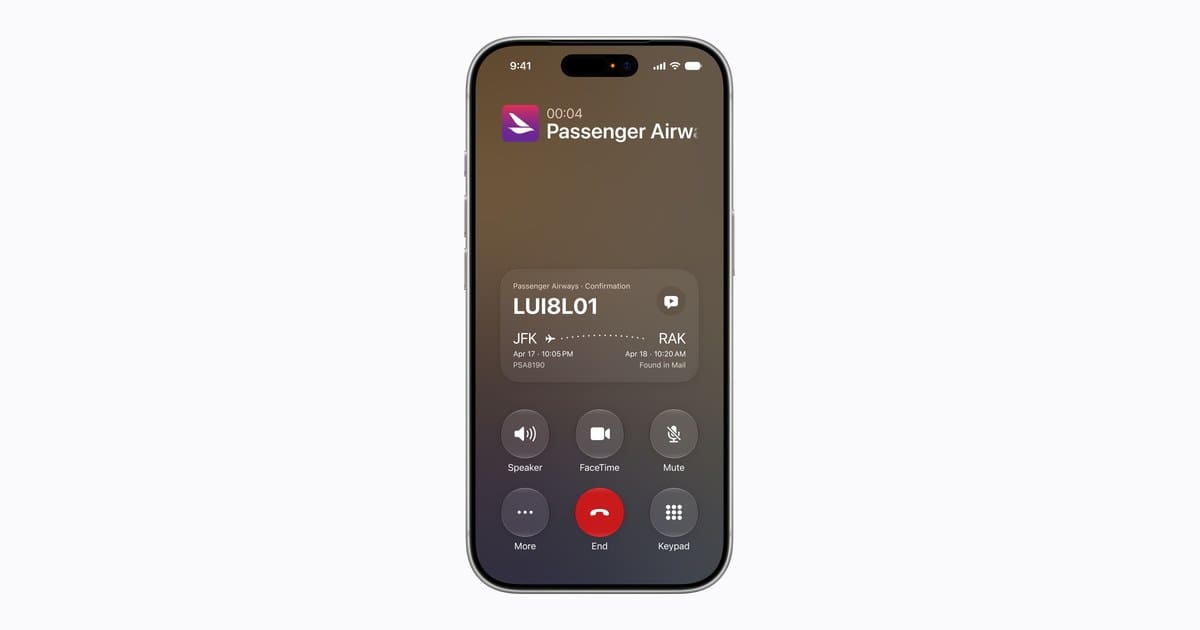
Call Context shows the idea outside Mail: when you ring an airline, the Phone app can find your confirmation code in Mail on its own. Opening suggestions to other developers fits the same thinking, since plenty of families book tables, track orders and manage plans in apps Apple does not make.
Common misconceptions about the update
- You do not need AI for better search. The new ranking is a core iOS 27 change, not an Apple Intelligence extra.
- Smart Reply does not answer for you. It offers options, and you still choose which one to use.
- Not every language gets everything yet. Mail suggestions are English-only, and Siri AI started in English.
Frequently asked questions about iOS 27 Mail
Do iOS 27 Mail features work on older iPhones?
Partly. Among the iOS 27 Mail features, the smarter search ranking is a general iOS 27 improvement, while suggestions, personalized Smart Reply and Siri AI need an Apple Intelligence iPhone such as an iPhone 15 Pro or any iPhone 16 or later.
Is Siri AI in Mail available in the EU?
Not at launch. Apple is holding Siri AI back from iPhone users in the EU for now, and it has not shared a date for when that changes.
Can Mail suggestions work in languages other than English?
Not yet. Apple lists suggestions in Mail and Messages as English-only, and it has not announced when other languages will follow.
Which new Mail tools your family will actually use
Anyone on iOS 27 should give the new search a fair try before going back to endless scrolling, since that change helps every single day. The iOS 27 Mail features built on Siri AI are worth exploring if you own an iPhone 15 Pro or newer and write mostly in English, while families in the EU or with kids under 13 can set that part aside for now. Either way, the plumber’s quote just got a lot easier to find.